
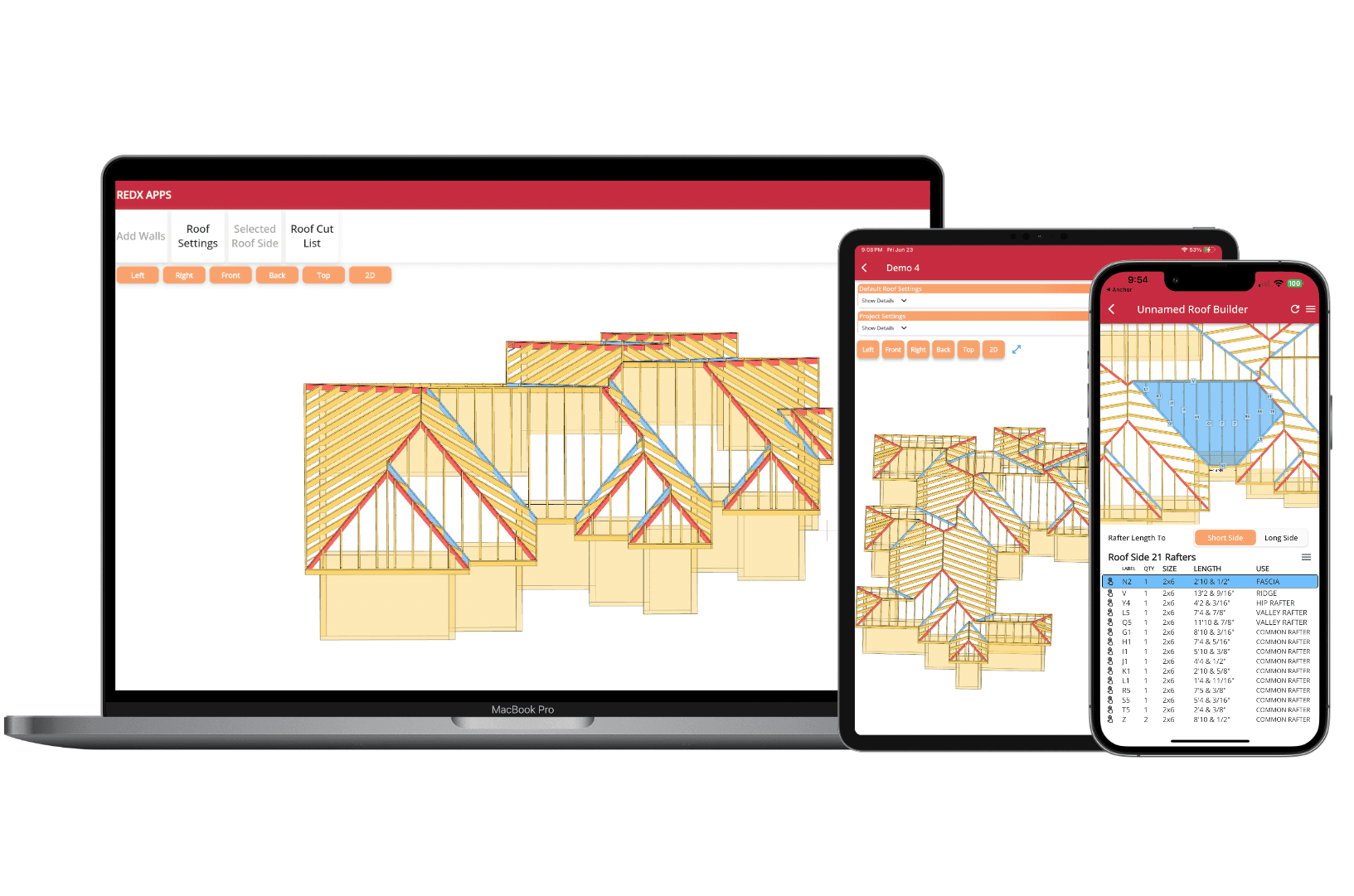
Design Any Roof Shape - Automatic Framing, Blueprints & Material Lists
Design Your Roof with AI. Just Describe It
RedX Roof Builder now includes RedX AI, your AI roof designer. Describe the roof you want in plain language and RedX AI builds the complete 3D design: rafters, ridges, hips, valleys, and overhangs. Ask for changes the same way, and refine every detail yourself whenever you want. Every roof RedX AI builds comes with the same rafter blueprints, elevation plans, and full material list.
- Build from a description. Tell RedX AI the size, shape, and style, and it generates the full roof in 3D, structure included.
- Edit in plain language. Ask for changes the same way you'd describe them to a builder and watch the design update instantly.
- You stay in control. Everything RedX AI builds is fully editable, so you can fine-tune framing, materials, and layout with the regular design tools.
Draw Any Perimeter - Your Roof Generates Instantly
Any Roof Shape, Generated in an Instant
Draw your building footprint of any shape and the full roof appears immediately. No loading, no waiting, no manual rafter placement. The moment your perimeter is set, your roof is ready.
Automatic Rafter, Ridge & Hip Generation
The app calculates and places every common rafter, hip rafter, valley rafter, and ridge board based on your perimeter. All lengths, angles, and bird's mouth cuts are computed instantly.
Full 3D Interactive View
Rotate, zoom, and inspect your roof from any angle in real time. See exactly how each side, hip, valley, and overhang fits together before a single board is cut.
Customize Every Side - Gable or Hip, Any Pitch
Gable or Hip - Your Choice Per Side
Switch any individual side of the roof between a gable end and a hip end with a single tap. Mix and match to create the exact roof profile you need for any architectural style.
Set Individual Pitch Angles Per Side
Each roof side can have its own pitch. Design an asymmetric roof, a shed dormer section, or a butterfly roof - all within the same model.
Live Preview of Every Change
Every adjustment - pitch change, gable conversion, overhang edit - updates the 3D model and all rafter calculations in real time so you always see the result before committing.
Full Rafter Control - Move, Inspect & Edit Every Detail
Move Individual Rafters
Drag any rafter to reposition it along the ridge or plate. Adjust spacing to work around obstructions, match existing framing, or hit your target on-center spacing exactly.
Export Individual Rafter PDFs
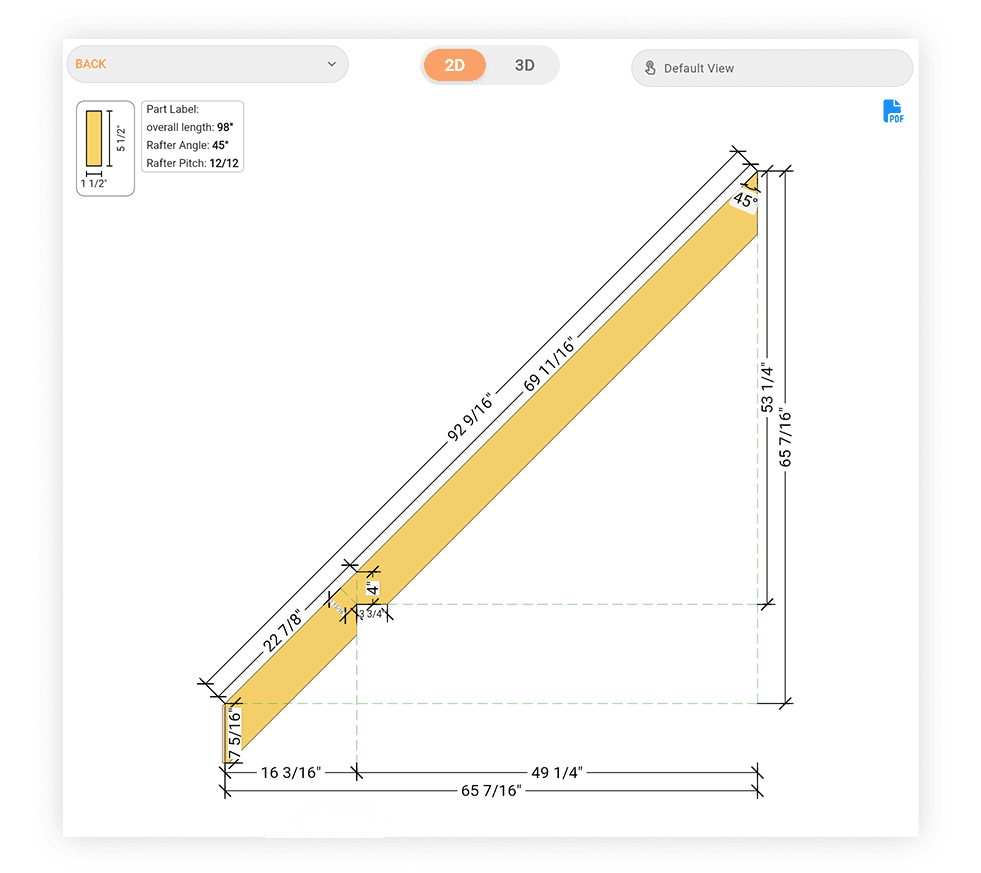
Export a detailed PDF blueprint for any rafter with a single tap. Each PDF includes the full rafter profile with all cut angles, lengths, bird's mouth dimensions, and HAP - ready to print and take to the job site.
Inspect Any Rafter Individually
Tap any rafter to see its full detail: total length, tail length, plumb cut angle, seat cut, bird's mouth depth, and HAP. Everything you need to cut it perfectly the first time.
Automatic Roof Plywood Layout & Sheet Count
Plywood Sheets Auto-Generated
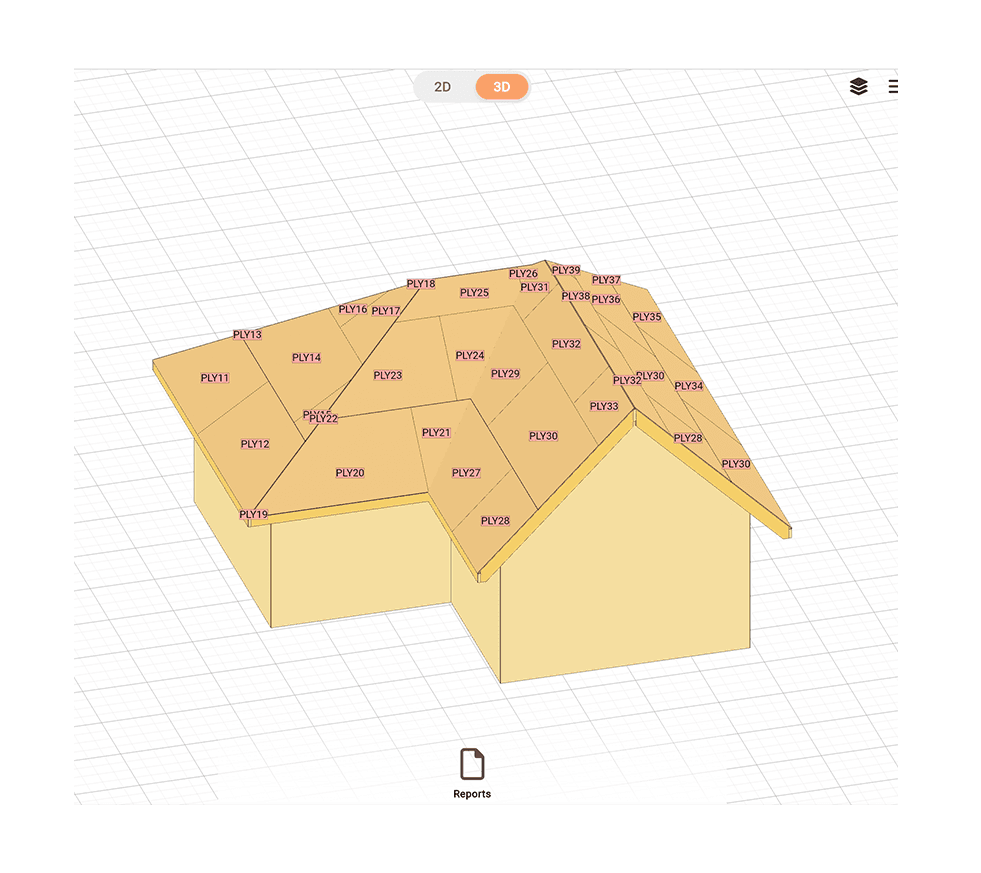
Once your roof framing is complete, the app lays out standard 4x8 plywood sheets across every roof plane automatically - including cut sheets at hips, valleys, and rake edges.
Exact Angles at Hips, Valleys & Rake Edges
Inspect plywood sheets, view the exact dimensions and angles needed so you know exactly how to cut it - no guessing, no wasted sheets.
Total Sheet Count for Your Order
Get the exact number of plywood sheets needed per roof plane and in total - so you order the right amount with no costly over-buy or last-minute lumber yard runs.
Generate Professional Roof Blueprints in One Click
Full Roof Blueprints with Labeled Parts
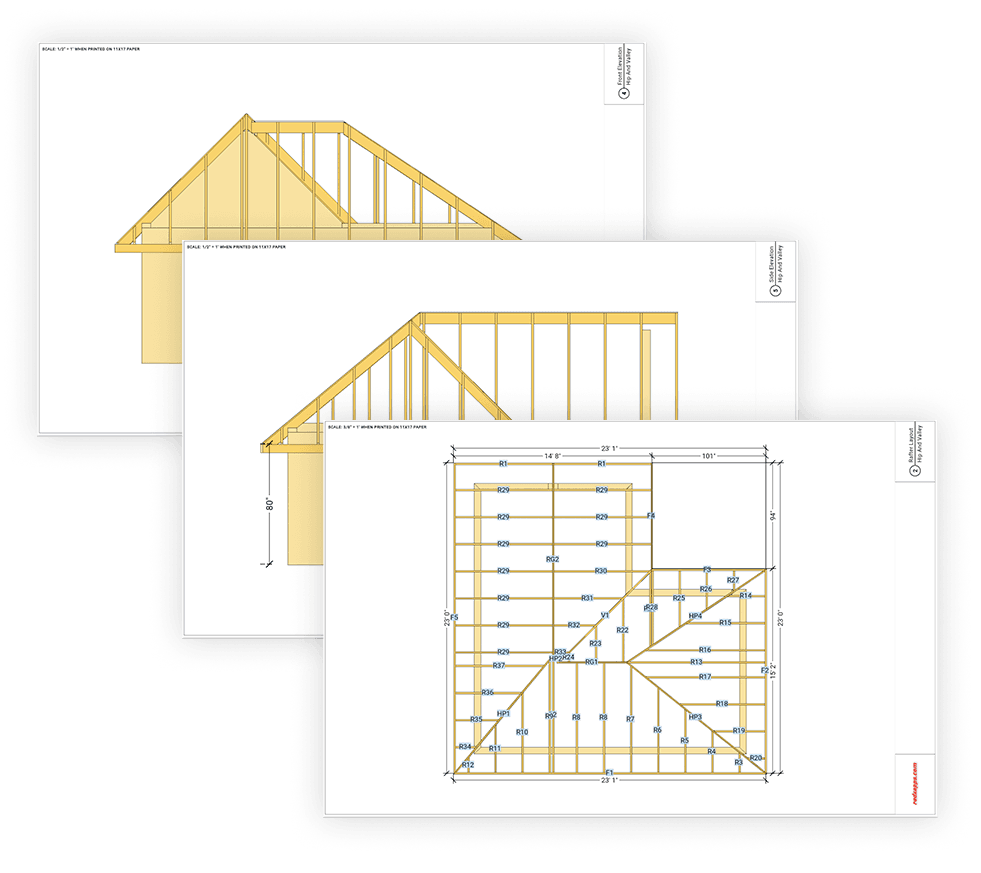
Generate a complete roof blueprint with every part clearly labeled - ridges, hips, valleys, common rafters, jack rafters, and fascia lines. All dimensions are included so anyone reading the plan knows exactly what goes where.
Elevation Drawings for Every Side
Export front, back, and side elevation views of your roof. Each elevation shows the roofline, overhang, ridge height, and pitch angle - the drawings contractors and permit offices need to approve the job.
Full Material List & Cut List
Every blueprint comes with a complete material list covering rafter quantities, ridge and fascia lengths, plywood sheet count, and total roof area - everything you need to price the job and order materials without going back and forth.
Built for Every Roof Builder
Contractors & Framers
Generate accurate rafter cut lists, plywood counts, and permit-ready blueprints in minutes. Spend less time calculating and more time framing.
DIY Homeowners
Design your own roof with confidence. Get exact rafter lengths, angles, and a full material list before you buy a single board - no engineering background required.
Students & Educators
Visualize complex roof geometry interactively - hips, valleys, gables, and rafters - making it an ideal teaching tool for carpentry, construction, and architectural drafting courses.
Roof Builder FAQ
Can AI design my roof for me?
Yes. RedX Roof Builder includes RedX AI, an AI roof designer - describe the roof you want in plain language, like "a hip roof on a 24x36 footprint with a 6/12 pitch," and RedX AI builds the full 3D roof with rafters, ridges, hips, and valleys. You can then refine any detail yourself, and still export rafter blueprints, elevation plans, and a complete material list.
How can I design a roof with AI?
Tell RedX AI what you want to build or change in everyday language - footprint size, pitch, gable or hip ends, overhangs - and it updates your 3D roof instantly. Every roof RedX AI generates uses the same framing engine as the rest of the app, so all rafter lengths, cut angles, and material quantities are always calculated.
What roof shapes can I design?
Any shape. Draw your building perimeter of any size and complexity and the roof generates automatically around it. Each side can independently be set as a gable or hip end with its own pitch.
Does the roof generate automatically from my perimeter?
Yes. Draw your wall perimeter and the app instantly generates the complete roof framing - common rafters, hip rafters, valley rafters, ridge boards, and jack rafters - with all lengths and angles calculated automatically.
Can I mix gable ends and hip ends on the same roof?
Yes. Each side of the roof can be set independently as a gable end or a hip end. You can also assign different pitch angles to different sides of the same roof for asymmetric or complex designs.
Can I move individual rafters and adjust overhangs?
Yes. You can drag any rafter to reposition it, and set the overhang depth independently for each roof side. All rafter tail lengths and fascia positions update automatically when you make changes.
Does it generate roof plywood layouts?
Yes. Once your framing is set, the app lays out 4x8 plywood sheets across every roof plane, calculates cut angles for partial sheets at hips and valleys, and gives you a total sheet count for ordering.
What documents can I export?
You can export rafter blueprints for each unique rafter type, a full roof plan view, elevation drawings, and a complete roof report with a cut list, material quantities, ridge and fascia lengths, plywood count, and total roof surface area.
Can I inspect individual rafters?
Yes. Tap any rafter in the 3D view to see its full detail - total length, tail length, plumb cut angle, seat cut, bird's mouth depth, and HAP - so you can cut it correctly the first time.
How do I calculate rafter length for a roof?
Enter your building width and roof pitch and RedX Roof Builder calculates every rafter length automatically - common rafters, hip rafters, valley rafters, and jack rafters - including tail length and all cut angles. No manual math needed.
Can I use this as a hip roof calculator?
Yes. The builder fully supports hip roofs. Set any or all sides as hips and the app calculates hip rafter lengths, backing angles, and jack rafter spacing automatically. You can also mix hip and gable ends on the same roof.
Can I get a roof framing plan for a permit?
Yes. Export a full roof framing plan with all parts labeled and dimensioned, plus elevation drawings for each side. These are the documents most building departments require for a roofing permit application.
How do I calculate how much lumber I need for a roof?
The app generates a complete material list for your entire roof - rafter quantities and lengths, ridge board length, fascia lengths, and plywood sheet count. Take it straight to the lumber yard and order exactly what you need.
Does the roof builder work on mobile?
Yes. RedX Roof Builder is available on iOS, Android, and as a web app. Design on your desktop and pull up your roof plans on site from your phone - your designs are saved to your account across all devices.
Start Designing Your Roof - Free
Draw any perimeter, customize every side, inspect every rafter, and export full blueprints and a complete material list. No engineering degree required.