
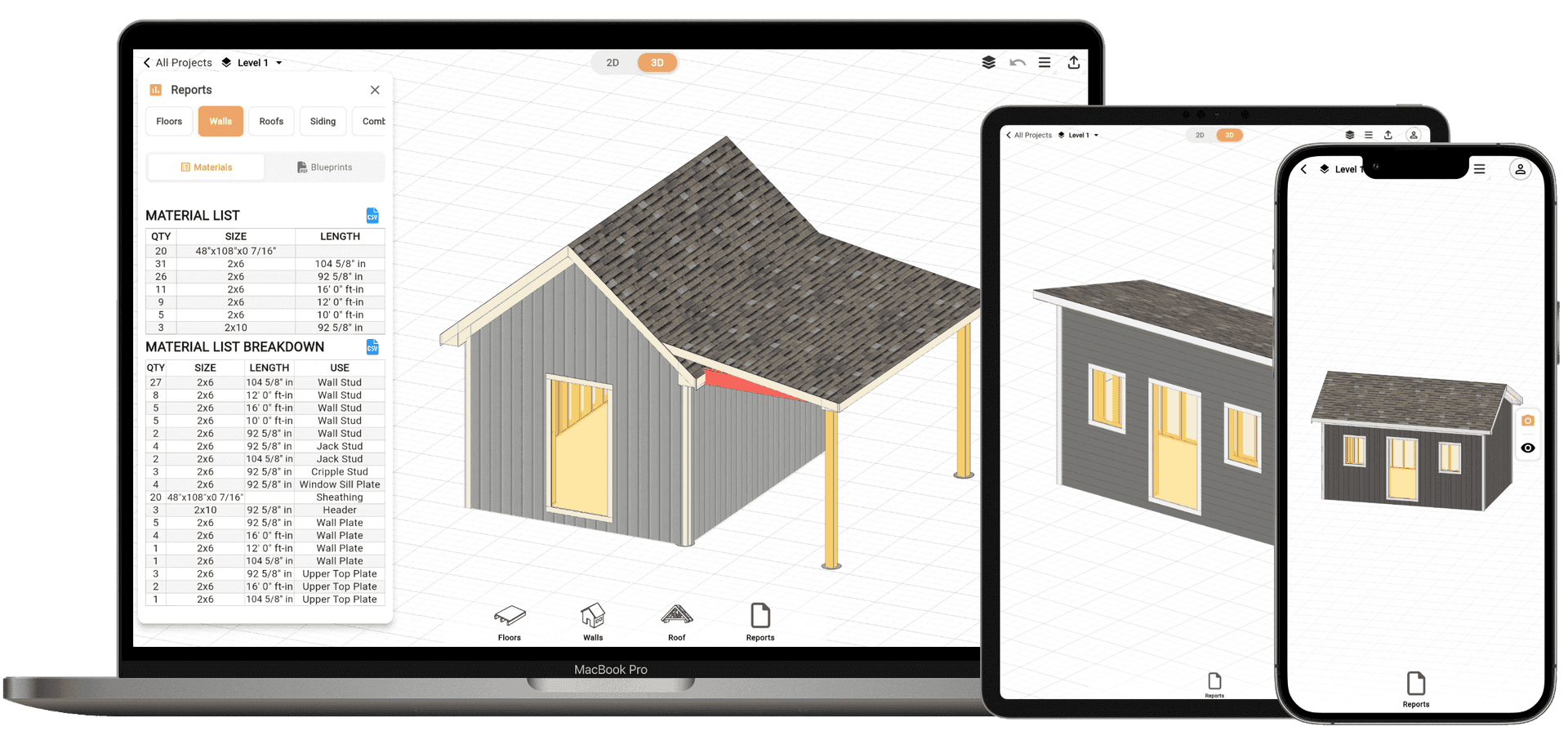
Design and Build Your Perfect Shed - Floor to Roof
Design Your Shed with AI. Just Describe It
RedX Apps now includes RedX AI, your AI shed designer. Describe the shed you want in plain language and RedX AI builds the complete 3D design: floor framing, walls, roof, doors, windows, and siding. Ask for changes the same way, and refine every detail yourself whenever you want. Every shed RedX AI builds comes with the same printable blueprints and full cut list.
- Build from a description. Tell RedX AI the size, shape, and style, and it generates the full shed in 3D, structure included.
- Edit in plain language. Ask for changes the same way you'd describe them to a builder and watch the design update instantly.
- You stay in control. Everything RedX AI builds is fully editable, so you can fine-tune framing, materials, and layout with the regular design tools.
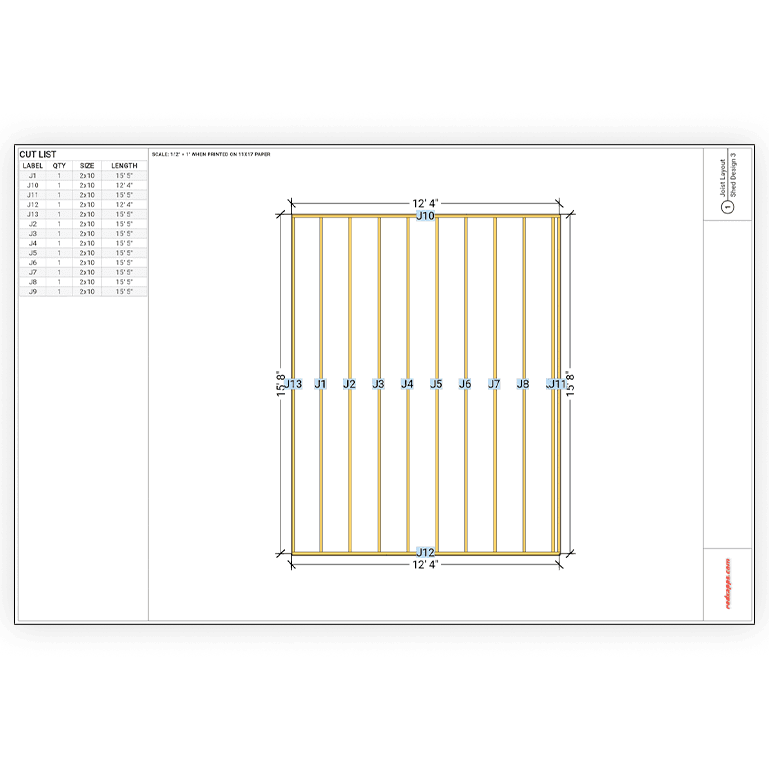
Shed Floor Framing: Joist Layout, Spacing & Span Calculations
Choose Your Lumber: 2x6, 2x8, or 2x10
Select the floor joist size that matches your load requirements. The builder automatically calculates spans and flags when your joist size is undersized for the span.
Automatic Joist Layout
Set your shed dimensions and joist spacing (12", 16", or 24" on center) and get an instant visual layout with every joist positioned and labeled.
Full Floor Cut List
Generate a complete cut list with rim joists, floor joists, blocking, and beam requirements - ready to take to the lumber yard.
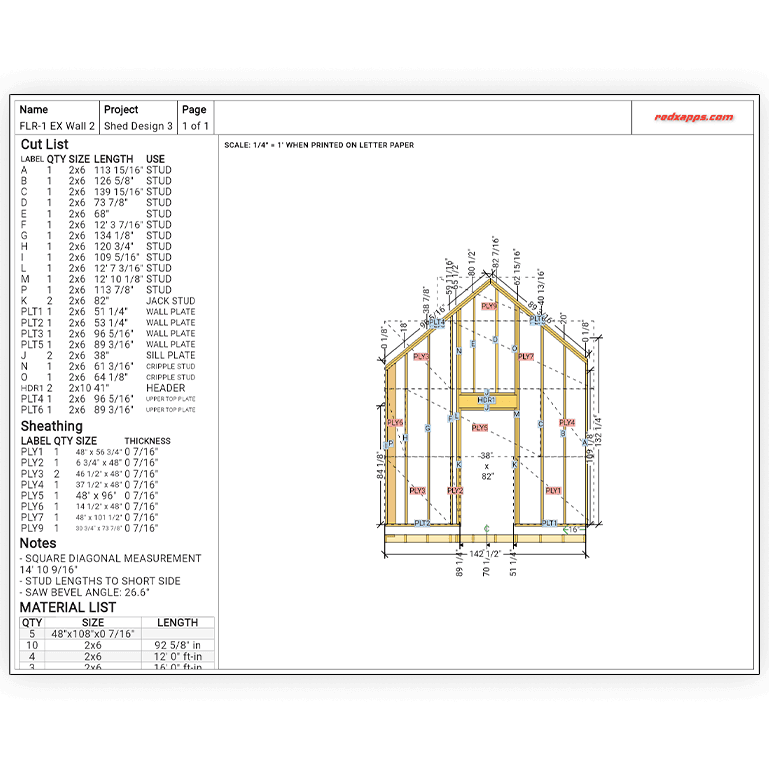
Shed Wall Framing: Straight Walls, Rake Walls & Gable Ends
Straight Walls with Doors & Windows
Frame any shed wall with precise stud placement, king studs, jack studs, headers, and cripples automatically calculated around any opening.
Rake Walls for Gable Ends
Set your roof pitch and let the rake wall builder calculate every stud length and bevel angle automatically. No manual trigonometry needed.
Instant Cut List & Material Count
Every wall generates a detailed cut list with stud lengths and a full material count - so you know exactly how many 2x4s or 2x6s to buy.
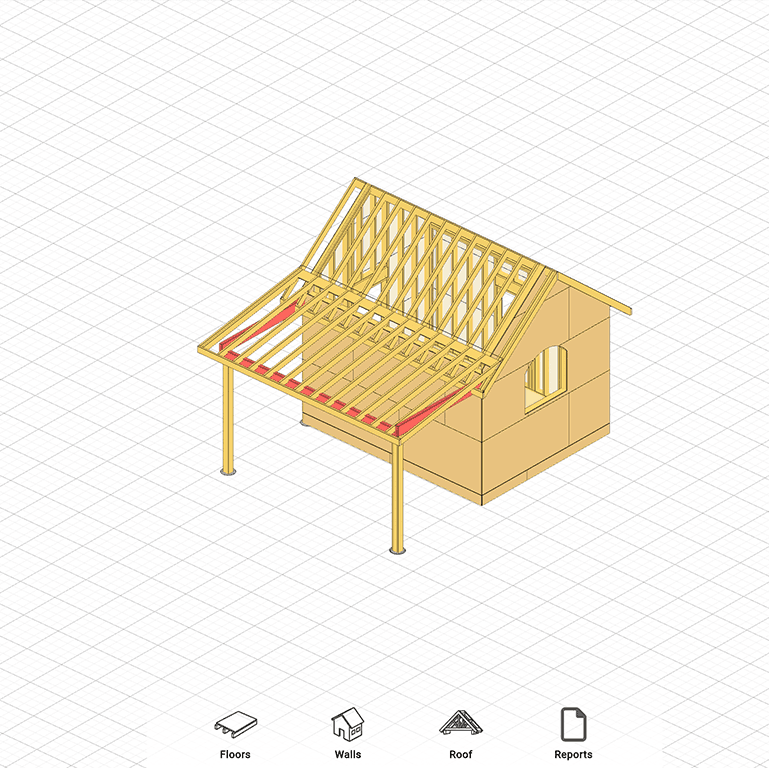
Shed Roof Builder: Gable, Single-Slope & Lean-To Roof Plans
Single-Slope / Lean-To Roofs
Ideal for simple sheds and storage structures. Set your wall heights and roof pitch to get exact rafter lengths, bird's mouth cuts, and overhang details.
Gable Roof Framing
Design a classic gable roof for your shed. Calculate common rafter lengths, ridge board length, and generate a full rafter cut list with all angles.
Rafter Blueprints & Cut List
Export detailed rafter blueprints showing every cut angle and dimension - printable and ready to use on-site.
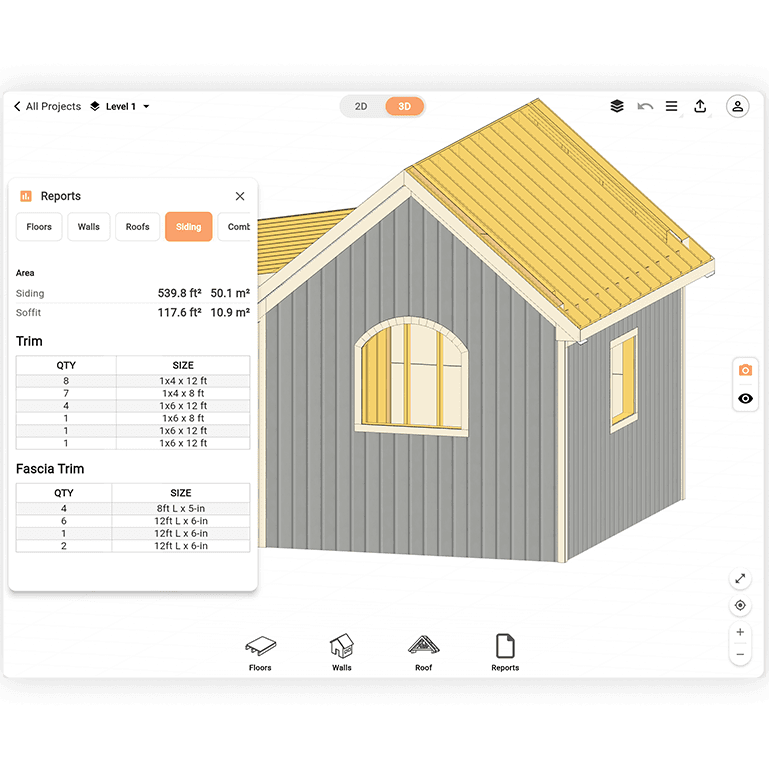
Shed Siding Layout: Calculate Coverage and Material Estimates
Visualize Siding Rows on Any Wall
Add siding to your wall plan and see exactly how horizontal lap siding, T1-11 panels, or board-and-batten lays out across the wall face.
Automatic Material Estimate
The tool calculates how many siding panels or linear feet you need based on your wall dimensions and siding exposure - no more guessing at the lumber yard.
Works with All Common Siding Types
Whether you're using T1-11, fiber cement lap siding, or wood planks, adjust the exposure width and get an accurate coverage estimate instantly.
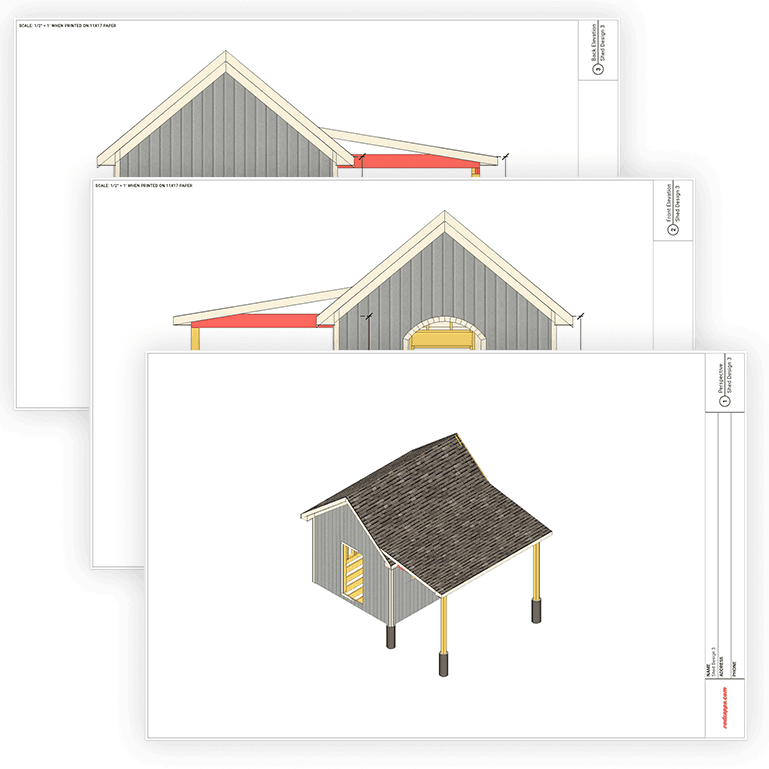
Export Printable Shed Blueprints with a Full Cut List
Professional-Grade Blueprint PDFs
Every plan - floor, walls, and roof - exports as a clean, dimensioned blueprint PDF you can print or share with a contractor or building department.
Complete Cut List for Every Section
Each blueprint includes a full cut list with part names, quantities, dimensions, and cut angles so your crew always knows exactly what to cut.
Save and Share Your Designs
Save your shed plans to your account to revisit and update them, or share a link with your builder or permit reviewer.
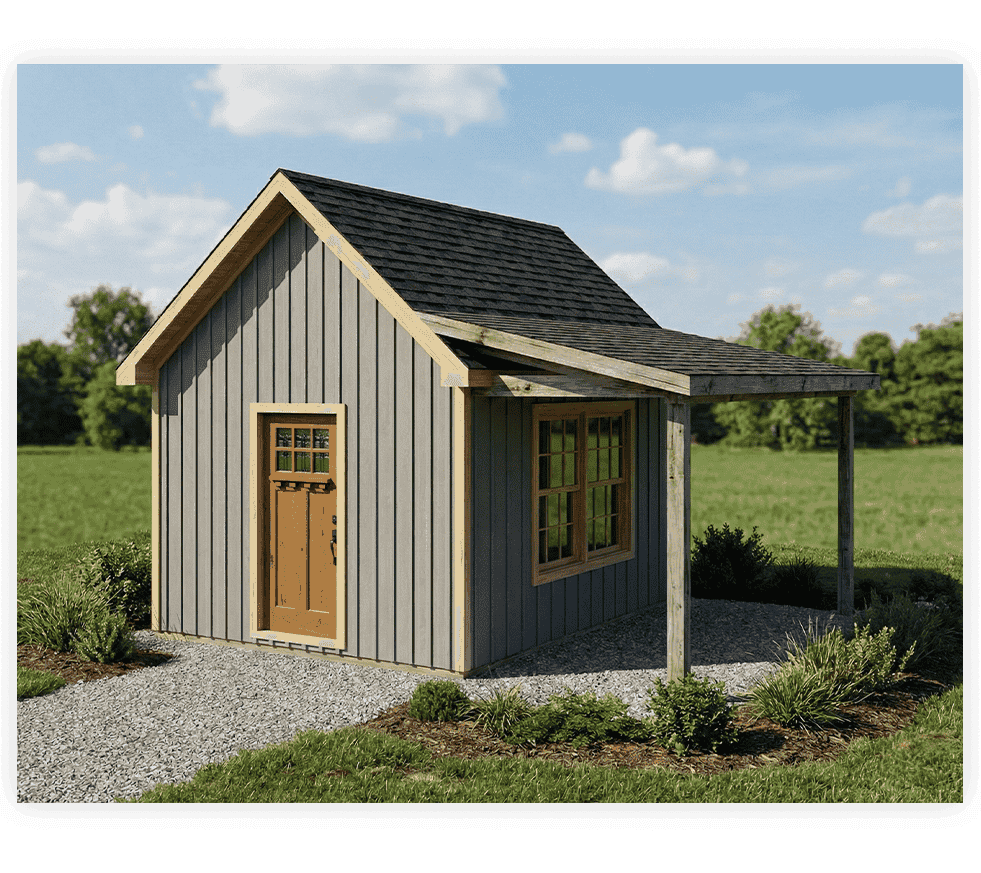
See Your Shed Before You Build It - Realistic 3D Renders
Photorealistic Exterior Visualization
Generate a realistic 3D render of your shed before breaking ground. See exactly how the roofline, siding, doors, and trim will look together - no surprises on build day.
Try Different Siding Styles & Colors
Switch between T1-11, lap siding, board-and-batten, or shiplap and compare color options instantly. Visualize a rustic wood look, a modern dark exterior, or a classic painted finish - all from the same design.
Share With Anyone
Export your render to share with a contractor, get HOA approval, or show your family what the finished shed will look like. Clear visuals make planning decisions faster and easier.
Built for Every Shed Builder
Contractors & Framers
Produce accurate framing plans and cut lists fast. Spend less time calculating and more time building.
DIY Homeowners
Plan your backyard shed with confidence. Get exact lumber quantities and step-by-step framing layouts before you buy a single board.
Students & Instructors
Visualize floor framing, wall layout, and roof structure interactively - great for carpentry and construction courses.
Shed Plan FAQ
Can AI design my shed for me?
Yes. RedX Apps includes RedX AI, an AI shed designer - describe the shed you want in plain language, like "a 10x12 shed with a gable roof and double doors on the front," and RedX AI builds the full 3D design with floor framing, walls, roof, and siding. You can then refine any detail yourself, and still export printable blueprints and a complete cut list.
How can I design a shed with AI?
Tell RedX AI what you want to build or change in everyday language - dimensions, roof style, doors, windows, joist sizes, or siding - and it updates your 3D shed design instantly. Every shed RedX AI generates uses the same framing engine as the rest of the app, so joist layouts, wall framing, and cut lists are always calculated.
How do I create a shed floor plan?
Open the Floor Plan Builder, enter your shed's width and length, select your floor joist size (2x6, 2x8, or 2x10) and spacing, and the tool generates a complete joist layout with a cut list. You can then export it as a blueprint PDF.
What size lumber should I use for shed floor joists?
For most sheds, 2x6 joists work well for spans up to 8 feet, 2x8 joists for spans up to 12 feet, and 2x10 joists for larger spans. The Floor Plan Builder flags undersized joists automatically based on your span and spacing.
Can I design a 12x16 shed plan with this tool?
Yes. Enter 12' x 16' as your shed dimensions and the tool builds out a full floor framing plan, wall layouts for all four sides, and a roof framing plan - any size works.
Does the tool generate a cut list for my shed?
Yes. Every floor plan, wall, and roof section generates a full cut list including part names, quantities, lengths, and cut angles. Export it as a PDF or print it directly.
Can I design a lean-to or single-slope shed roof?
Yes. The Single-Slope Roof Builder handles lean-to and shed roofs. Set your wall heights and pitch to get exact rafter lengths, bird's mouth cuts, and overhang dimensions.
Start Your Shed Plan Today - Free
Design a complete shed from floor to roof in minutes. Get a cut list, framing layout, and printable blueprint - all without a CAD degree or expensive software.