
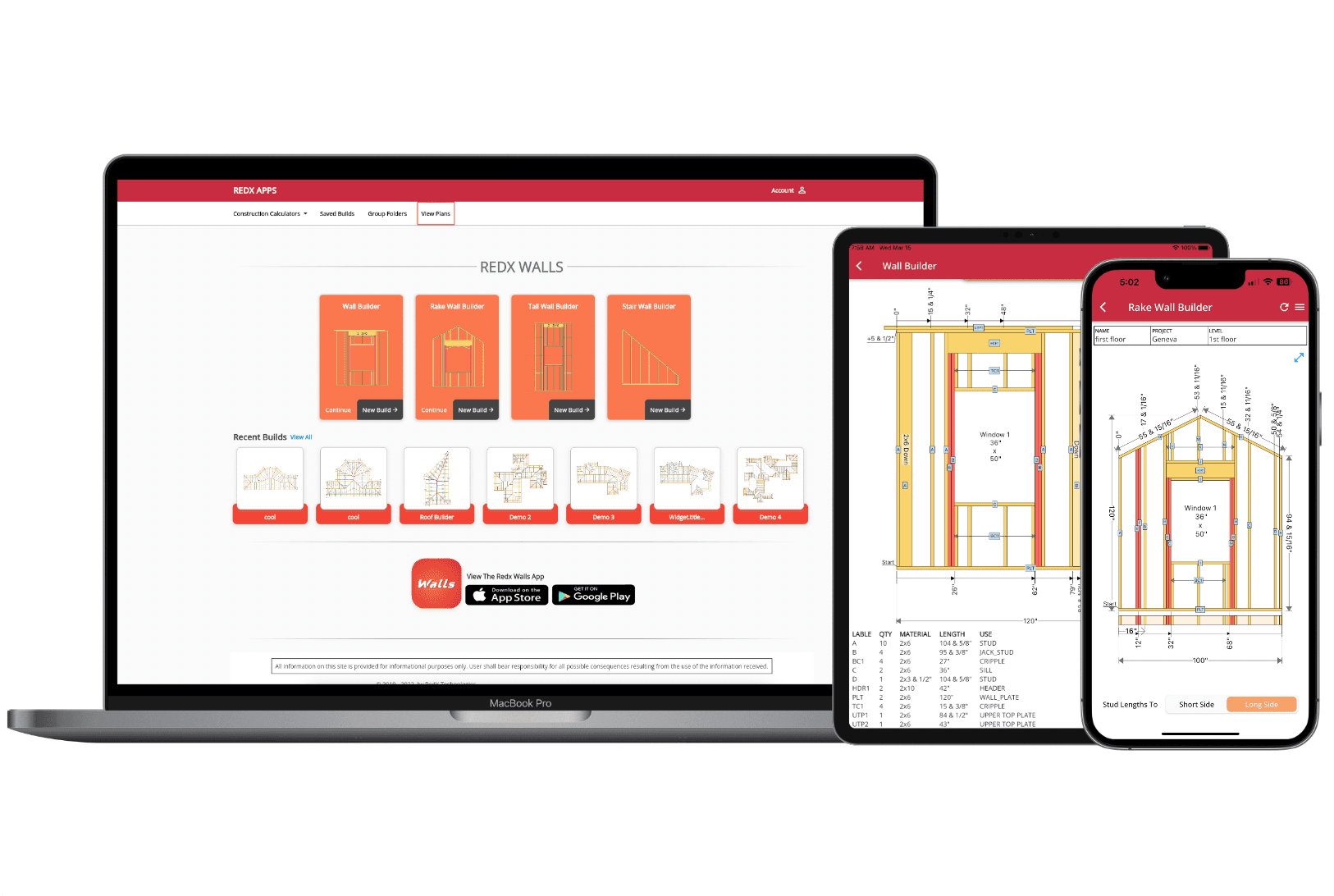
Wall Blueprint Maker - Create Framing Plans with PDF Export
Try the Wall Blueprint Maker
Design your wall below and see the blueprint update in real time. Add doors, windows, and intersecting walls, then export your framing plan as a PDF.
Why Use a Wall Blueprint Maker?
A wall framing blueprint takes the guesswork out of construction. Instead of marking stud positions by hand on your top and bottom plates, you get a scaled drawing that shows exactly where every component goes. The blueprint maker calculates stud spacing, sizes headers for your openings, and generates a cut list so you know exactly what lumber to buy and how to cut it.
For contractors, a printed blueprint means faster plate layout on the job site and fewer mistakes. Hand the PDF to your crew and everyone knows where every stud, king stud, jack stud, and cripple goes without stopping to measure. For DIYers, it means building with confidence because you can see the entire wall framing plan before you pick up a hammer.
The wall blueprint maker handles the complexity of framing around openings automatically. Add a window or door and the plan updates instantly with the correct header, trimmer studs, and cripples. Move the opening and every measurement recalculates. When you are satisfied with the layout, export the blueprint as a PDF and take it to the lumber yard or the job site.
Use the wall blueprint maker online from any browser or download the app on iPhone or Android to design framing plans on the job site. Your projects sync across devices so you can start a blueprint on your desktop and pull it up on your phone when you are ready to build.
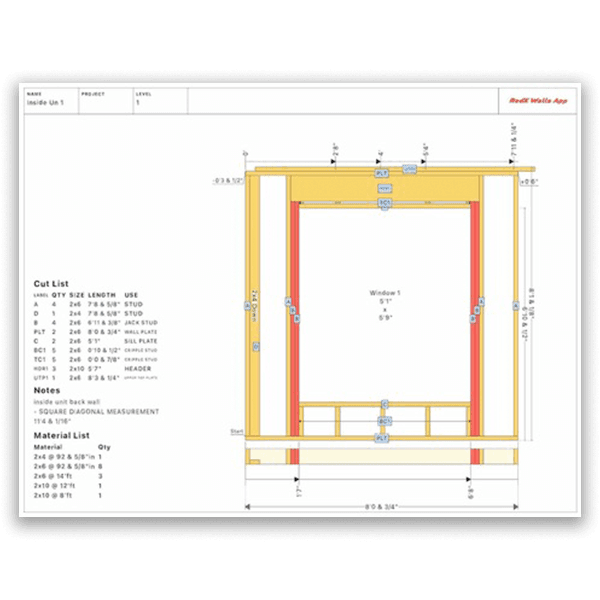
Export Scaled PDF Blueprints - Print or Share
Scaled Framing Plan
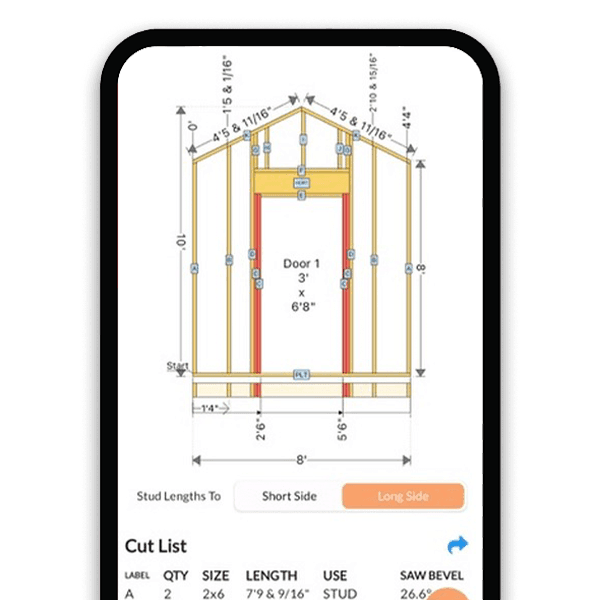
The blueprint includes every stud, plate, header, and opening drawn to scale with precise measurements. Print it and use it directly for plate layout on the job site.
Complete Cut List on Every Blueprint
Each PDF includes an itemized cut list with lumber type, quantity, and exact cut length for every component. Take it straight to the lumber yard.
Print, Save, or Share
Export your wall framing plan as a PDF. Print it for the job site, save it to your phone, or share it with your crew, client, or building inspector.
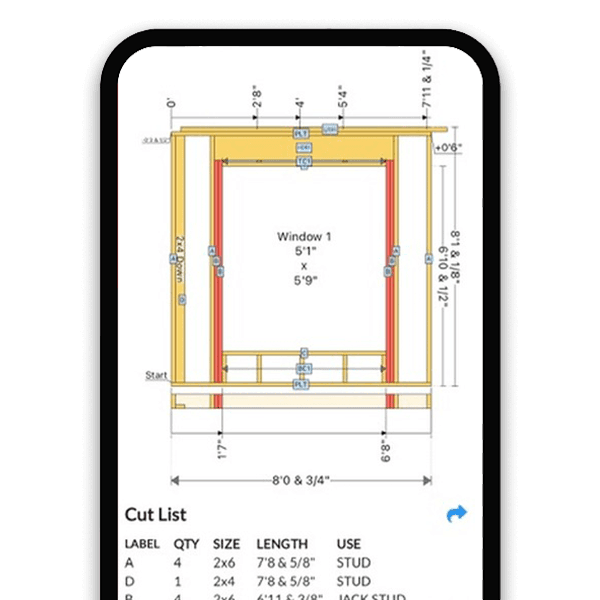
Automatic Stud Layout - The Blueprint Draws Itself
Enter Dimensions, See the Plan
Input wall length, height, and stud spacing. The blueprint maker positions every stud, plate, and blocking with exact measurements instantly.
Add Openings Anywhere
Place doors and windows along the wall. The blueprint automatically frames each opening with king studs, jack studs, headers, and cripples.
Real-Time Updates
Change a dimension, move an opening, or switch stud spacing and the entire framing plan recalculates. The blueprint is always current with your design.
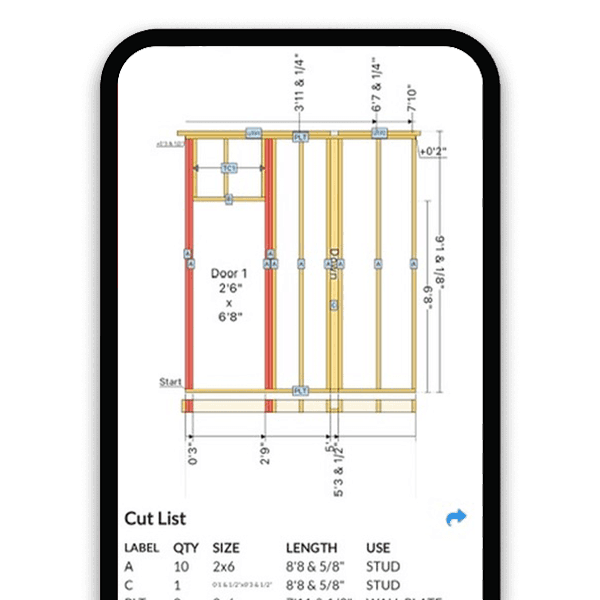
Automatic Cut List & Material Optimization
Every Component Itemized
The cut list breaks down every piece of lumber your wall needs: top plates, bottom plates, studs, king studs, jack studs, headers, cripple studs, and blocking. Each item lists the exact quantity, lumber size, and cut length.
Optimized Material Counts
The blueprint maker calculates the minimum lumber you need based on your exact design. No more guessing, over-buying, or making extra trips to the lumber yard. The material list accounts for openings, intersections, and doubled studs so nothing is missed and nothing is wasted.
Lumber Length Optimization
See which cuts can come from the same board to minimize waste. The cut list groups components by lumber size so you can plan your cuts efficiently and get the most out of every piece of framing lumber.
Take It to the Lumber Yard
Export or print the cut list as part of your PDF blueprint. Hand it to the yard and get exactly what you need, pre-sorted by size and quantity. On a tight budget, the optimized list helps you price out the wall before you commit.
Blueprints for Every Wall Type
Straight Wall Blueprints
Standard wall framing plans with uniform stud heights, openings, and intersecting walls. The most common blueprint for residential construction.
Rake Wall Blueprints
Generate framing plans for gable-end walls with angled top plates. Every stud gets its own calculated length and bevel angle on the blueprint.
Tall Wall & Interior Wall Plans
Create blueprints for tall commercial walls with doubled studs or simple interior partitions with door openings. The plan adapts to any height and configuration.
How to Create a Wall Framing Blueprint
- 1
Select Your Wall Type
Choose straight wall, rake wall, tall wall, single slope, or interior wall. Each type generates a blueprint tailored to its framing requirements.
- 2
Enter Wall Dimensions
Input wall length, height, and stud spacing (16" or 24" on center). For rake walls, enter the roof pitch angle.
- 3
Add Doors, Windows & Intersections
Place openings by specifying position, width, and height. The blueprint maker frames each opening automatically with the correct header and trimmer studs.
- 4
Review Your Framing Plan
Check the visual stud layout with all measurements. Verify stud positions, opening framing, and the cut list before exporting.
- 5
Export Your PDF Blueprint
Generate a scaled PDF with the full framing plan and cut list. Print it, share it with your crew, or save it for your records.
Wall Blueprints for Every Builder
Contractors & Framers
Generate a blueprint for every wall on the job. Hand the PDF to your crew with exact stud positions, header sizes, and a cut list. No more hand-drawn sketches.
DIY Homeowners
Plan your wall framing before you buy lumber. See the complete framing layout, know exactly what materials to purchase, and build with a professional blueprint.
Designers & Estimators
Create accurate wall framing plans with material lists for bids and permits. Export clean blueprints to include in project documentation.
Wall Blueprint Maker FAQ
How do you calculate the material list for a wall?
To calculate a wall material list manually, start with studs: divide the wall length by your on-center spacing (16" or 24") and add one. Add two plates for the top (doubled) and one for the bottom. For each door or window opening, add two king studs, two jack studs, a header, and cripple studs above and below. Then account for corner studs, intersecting wall studs, and blocking. A wall blueprint maker does all of this automatically - enter your dimensions and openings and it generates an optimized material list with every piece of lumber counted and sized.
How do I make a framing plan for a wall?
Start by measuring your wall length and height. Decide on stud spacing (16" on center for load-bearing walls, 24" for non-load-bearing). Mark stud positions on your top and bottom plates, then plan framing around any door or window openings - each opening needs king studs, jack studs, a header, and cripple studs. You can draw this by hand or use a wall blueprint maker to generate a scaled plan with all measurements and a cut list automatically.
What should a wall framing blueprint include?
A complete wall framing blueprint should show the top and bottom plate layout, every stud position with on-center spacing, framing details around doors and windows (king studs, jack studs, headers, cripples), overall wall dimensions, and a cut list with lumber sizes and quantities. A good blueprint also includes header sizes, corner framing, and any blocking or intersecting wall connections.
How do I frame a wall with a door opening?
Frame the wall normally with studs on your chosen spacing. Where the door goes, install two full-height king studs on each side of the rough opening. Inside those, add shorter jack studs (trimmers) that support the header. Place a header beam across the top of the opening, and add cripple studs between the header and the top plate. The rough opening width should be the door width plus 2 inches for shimming. A wall blueprint maker calculates all of these positions and sizes automatically.
How many studs do I need to frame a wall?
For a standard wall with 16-inch on-center spacing, divide the wall length in inches by 16 and add 1. A 10-foot wall needs about 9 studs for the main layout. Then add studs for corners (3 per corner), each intersecting wall (2-3 studs), and openings (2 king studs plus 2 jack studs per opening). For 24-inch spacing, divide by 24 instead. A wall blueprint maker counts every stud automatically, including all the extras for openings and intersections.
Do I need CAD software to draw wall framing plans?
No. Traditional CAD software like AutoCAD is powerful but overkill for wall framing plans. A wall blueprint maker is purpose-built for framing - you enter dimensions and openings, and it generates a scaled blueprint with stud layout, measurements, and a cut list. No drafting skills needed. It runs in your browser or on your phone.
What is the difference between 2x4 and 2x6 wall framing?
2x4 walls are 3.5 inches deep and are the standard for interior partitions and many exterior walls. 2x6 walls are 5.5 inches deep, providing more space for insulation (R-19 vs R-13) and greater structural strength. Most building codes require 2x6 exterior walls in cold climates. The lumber cost is higher, but energy savings offset it over time. A wall blueprint maker lets you switch between 2x4 and 2x6 to compare material counts and layouts.
Is there a wall framing app for iPhone or Android?
Yes. RedX Walls is available on iPhone, iPad, and Android. It lets you design wall framing plans on your phone, calculate stud layouts with openings, generate cut lists, and export PDF blueprints directly from the job site. It also runs in any web browser with no installation needed.
How do I calculate a cut list for wall framing?
List every component your wall needs: bottom plate (wall length), doubled top plate (wall length x2), studs (wall height minus plate thickness x stud count), headers (opening width plus jack stud allowance), jack studs (header height to bottom plate), and cripples (top plate to header). Each piece needs its lumber size and cut length. Doing this manually takes time, especially with multiple openings. A wall blueprint maker generates the full cut list instantly from your design.
How do I reduce lumber waste when framing a wall?
Plan your cuts before you start. Group studs by length so you can cut multiple pieces from a single board. Use offcuts from longer pieces for cripple studs and blocking. Buy the right lumber lengths for your wall height - 92-5/8 inch precut studs for 8-foot walls avoid cutting altogether. A wall blueprint maker with an optimized cut list helps you see exactly what you need so you buy the right quantities and minimize waste.
Learn More
Create Your Wall Blueprint - Free
Design your wall, see the stud layout, and export a scaled PDF blueprint with a complete cut list. The wall blueprint maker that turns your dimensions into a professional framing plan.