
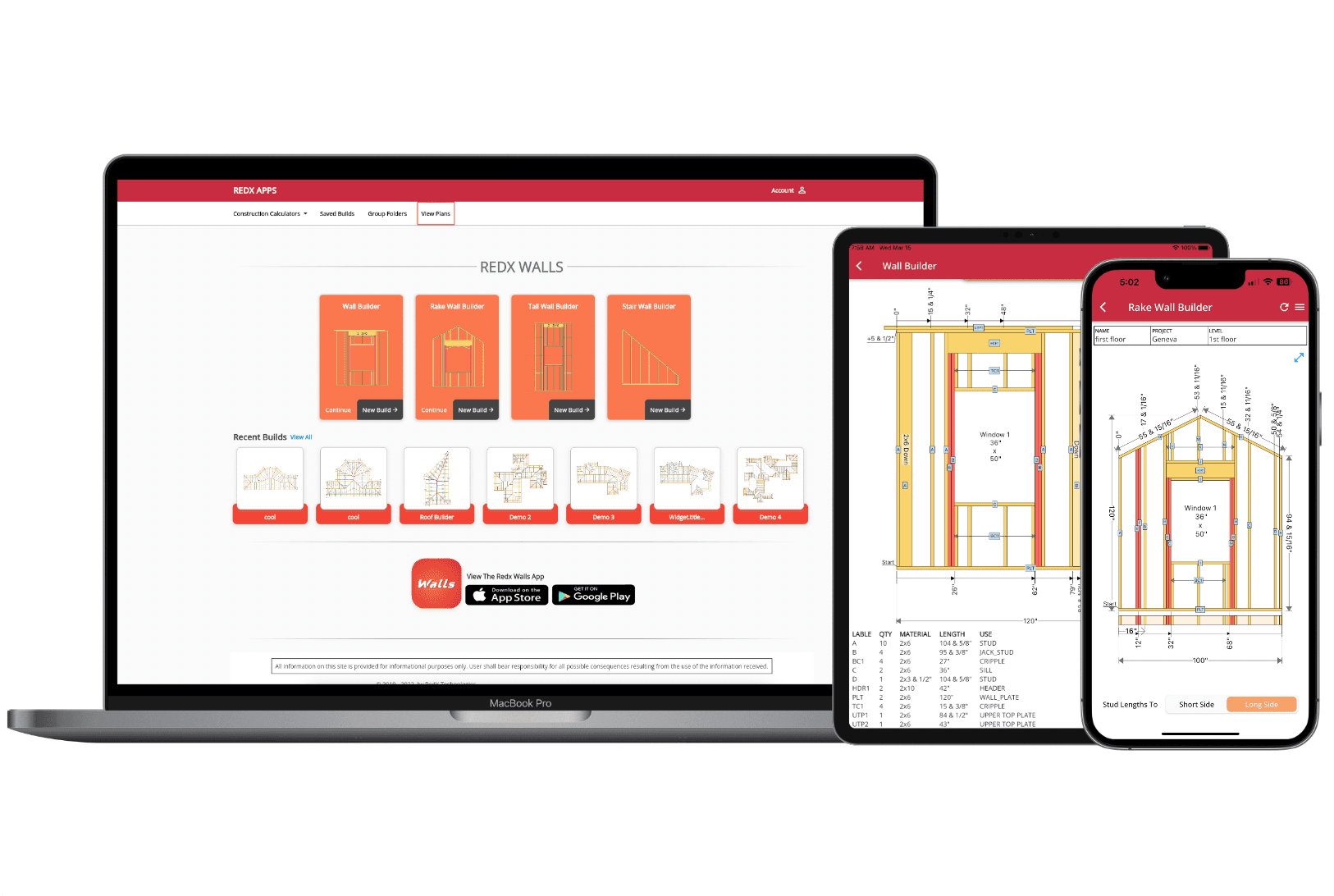
Wall Framing Calculator - Free Stud Layout, Cut List & Blueprint
Try the Wall Framing Calculator
Enter your dimensions below to see the layout, cut list, and material count. For the full experience with blueprint export, open the full builder.
Why Use a Wall Framing Calculator?
A wall framing calculator eliminates the tedious math behind stud layout. Instead of manually marking plate positions, counting studs, and sizing headers for every opening, the stud calculator does it all in seconds. Enter your wall length, height, and stud spacing - then add doors, windows, and intersecting walls - and get a precise visual layout with every component positioned and measured.
The framing calculator is especially valuable when your wall has multiple openings. Every door and window requires king studs, jack studs, a header, and cripple studs - and spacing between openings must still land on the original on-center layout. Getting this wrong means wasted lumber, rework, and sheathing that doesn't land on studs. The stud calculator handles all of this automatically.
Whether you're a contractor framing dozens of walls a week or a DIYer tackling your first interior partition, a wall framing calculator saves time, reduces errors, and gives you a printable blueprint you can follow on-site.
Automatic Stud Layout - Every Stud Placed for You
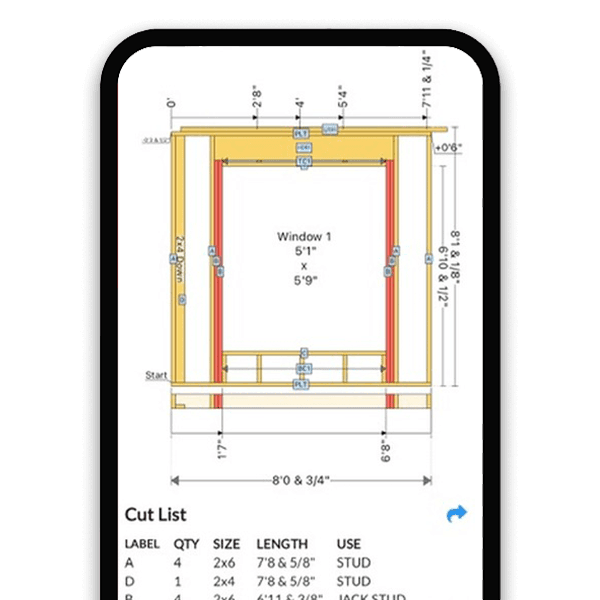
Enter Dimensions, Get a Layout
Input wall length, height, and stud spacing (16" or 24" OC). The framing calculator instantly positions every stud, plate, and blocking with exact measurements.
Handles All Framing Components
The stud calculator places top plates, bottom plates, regular studs, corner studs, and partition studs. Add openings and it automatically inserts king studs, jack studs, headers, and cripples.
2x4 and 2x6 Support
Switch between 2x4 and 2x6 stud sizes. The wall framing calculator adjusts material counts and layout for the lumber size you select.
Complete Cut List - Know Exactly What to Buy
Every Piece Listed
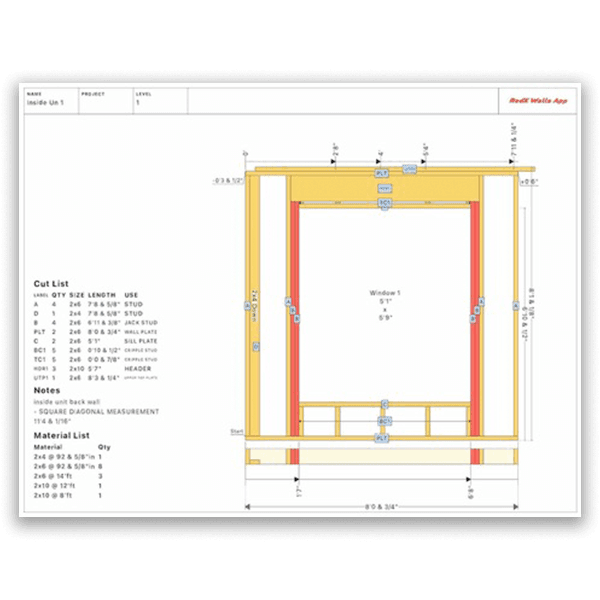
The framing calculator generates a cut list with plates, studs, headers, jack studs, king studs, and cripples - each with exact quantity, lumber size, and cut length.
Accurate Material Count
No more over-buying or running short. The stud calculator counts every piece of lumber your wall needs based on your exact design, including extra studs for openings and intersections.
Export & Print
Export your cut list as part of a printable wall framing blueprint PDF. Take it to the lumber yard or hand it to your crew - no handwritten lists needed.
One Calculator for Every Wall Type
Straight Wall Calculator
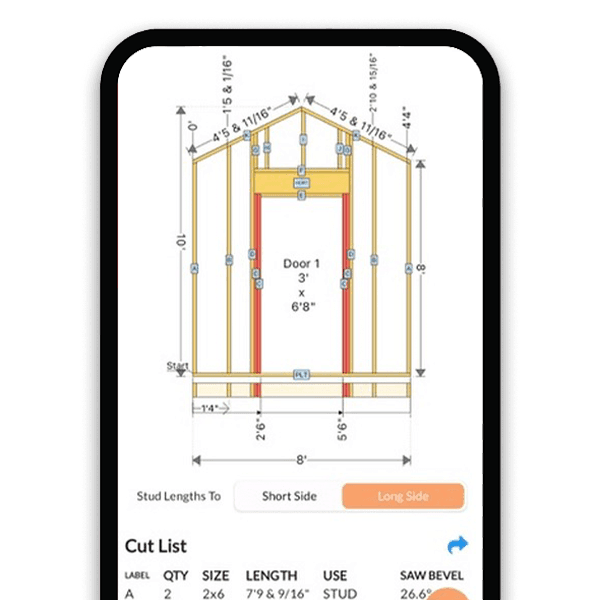
Standard wall framing with uniform stud heights. Add doors, windows, intersecting walls, and beam pockets. The most common framing calculator for residential construction.
Rake Wall Calculator
Calculate every stud length and bevel angle for gable-end walls automatically. Set your roof pitch and the framing calculator does all the trigonometry.
Tall Wall & Interior Wall Calculator
Frame tall commercial walls with doubled studs and custom spacing, or simple interior partition walls with door openings. The stud calculator adapts to any height and configuration.
How to Use the Wall Framing Calculator
- 1
Select Your Wall Type
Choose straight wall, rake wall, tall wall, single slope, or interior wall. Each type has inputs tailored to its framing requirements.
- 2
Enter Wall Dimensions
Input wall length, height, and stud spacing. For rake walls, enter the roof pitch. For tall walls, set doubled stud options and load points.
- 3
Add Doors, Windows & Intersections
Place openings anywhere along the wall. The stud calculator sizes headers and positions king studs, jack studs, and cripples automatically.
- 4
Review the Stud Layout & Cut List
Check the visual framing layout and cut list. Every stud, plate, and header is listed with its exact length and quantity.
- 5
Export Your Blueprint
Generate a printable wall framing blueprint as a PDF. Print it, share it with your crew, or save it for your records.
Framing Calculator for Every Builder
Contractors & Framers
Calculate stud layouts and cut lists in seconds. Print a blueprint for every wall on the job - no manual takeoffs or spreadsheets.
DIY Homeowners
Plan your wall framing with confidence. Know exactly how many studs to buy, where every stud goes, and what sizes to cut before you start building.
Students & Instructors
Visualize how framing calculations work interactively. See stud spacing, header sizing, and opening framing update in real time.
Framing Calculator FAQ
How do I calculate how many studs I need for a wall?
Divide your wall length in inches by the on-center spacing (16 or 24 inches) and add 1 for the end stud. A 10-foot wall at 16" OC needs about 9 field studs. Then add extras: 3 studs per corner, 2-3 per intersecting wall, and 2 king studs plus 2 jack studs per door or window opening. Cripple studs above and below openings add more. A wall framing calculator counts every piece automatically from your dimensions.
What is the difference between 16 and 24 inch stud spacing?
16-inch on-center spacing is required for load-bearing walls, exterior walls, and walls carrying heavy loads from above. It gives more structural support and makes it easier to attach sheathing and drywall. 24-inch spacing uses less lumber and is acceptable for non-load-bearing interior partition walls and some 2x6 exterior walls. Always check your local building code before choosing.
How do you calculate a header size for a wall opening?
Header size depends on the span (opening width) and the load the wall carries. For non-load-bearing walls, a doubled 2x4 works for most openings. For load-bearing walls, common rules of thumb are: doubled 2x6 for spans up to 4 feet, 2x8 for up to 6 feet, 2x10 for up to 8 feet, and 2x12 for up to 10 feet. Always verify with your local code or an engineer for large spans. A framing calculator sizes headers automatically based on your opening width.
How much lumber do I need to frame a wall?
For an 8-foot wall, you need: one bottom plate and two top plates (each the wall length), studs at your chosen spacing, plus extra studs for corners, intersections, and openings. Each opening adds king studs, jack studs, a header, and cripples. A 10-foot wall with one door at 16" OC typically needs around 15-18 pieces of lumber total. A wall framing calculator generates an exact material list from your specific design so you buy only what you need.
What is the rough opening size for a door?
The rough opening for a standard interior door is the door width plus 2 inches (for shimming) and the door height plus 2.5 inches (for the threshold and shimming). A standard 36-inch door needs a 38-inch wide by 82.5-inch tall rough opening. Exterior doors and sliding doors have different requirements - check the manufacturer specifications. A framing calculator sets the rough opening correctly and frames the king studs, jack studs, and header around it.
How do I frame a corner where two walls meet?
The standard method is a three-stud corner: two studs in the first wall with blocking between them, and a third stud in the intersecting wall that nails to the blocking. This provides nailing surfaces for drywall on both sides. An alternative is the California corner (two studs plus drywall clips), which uses less lumber and provides better insulation in the corner cavity.
What are king studs and jack studs?
King studs are full-height studs that run from the bottom plate to the top plate on each side of a door or window opening. Jack studs (also called trimmer studs) are shorter studs that sit inside the king studs and support the header beam. The jack stud height equals the rough opening height. Together, king and jack studs transfer the load from the header down to the bottom plate and foundation.
How do I calculate stud length for a rake wall?
Each stud in a rake wall has a different length because the top plate follows the roof slope. For each stud position, calculate: base wall height plus (distance from the short end x tangent of the roof pitch). The top of each stud also needs a bevel cut matching the pitch angle. Doing this manually for every stud is tedious and error-prone. A wall framing calculator computes every stud length and bevel angle instantly when you enter the pitch.
Is there a free wall framing calculator online?
Yes. The RedX wall framing calculator is free to use online in your browser. Enter your wall dimensions and stud spacing, add doors and windows, and see the full stud layout with a material count at no cost. Premium features like PDF blueprint export, saving projects, and advanced wall types are available with a subscription. The calculator also works on iPhone and Android.
Learn More
Calculate Your Wall Framing - Free
Enter your wall dimensions and get an instant stud layout, cut list, and printable blueprint. The wall framing calculator that does the math so you can focus on building.